One license · all formats · lifetime updates

Busbar
Every Track, One Machine

Analog saturation, but shared. Every track runs through one machine — push the kick and the whole mix leans with it, the way a console glues a mix.

Six deaf boxes become six channels of one desk. Each track feels how hard the others push, no routing.

Buy Busbar — €39 ↓ Download Demo
1 Shared Machine
6 Characters
64 Channels
3 Platforms

See It in Action

Hear One Machine

One Busbar on every track of “Dark Good Time”, all sharing a single machine. Flip between the characters — the whole mix leans together, the way a console does.

Music: xeniclex · loudness-matched A/B, rendered in a real DAW.

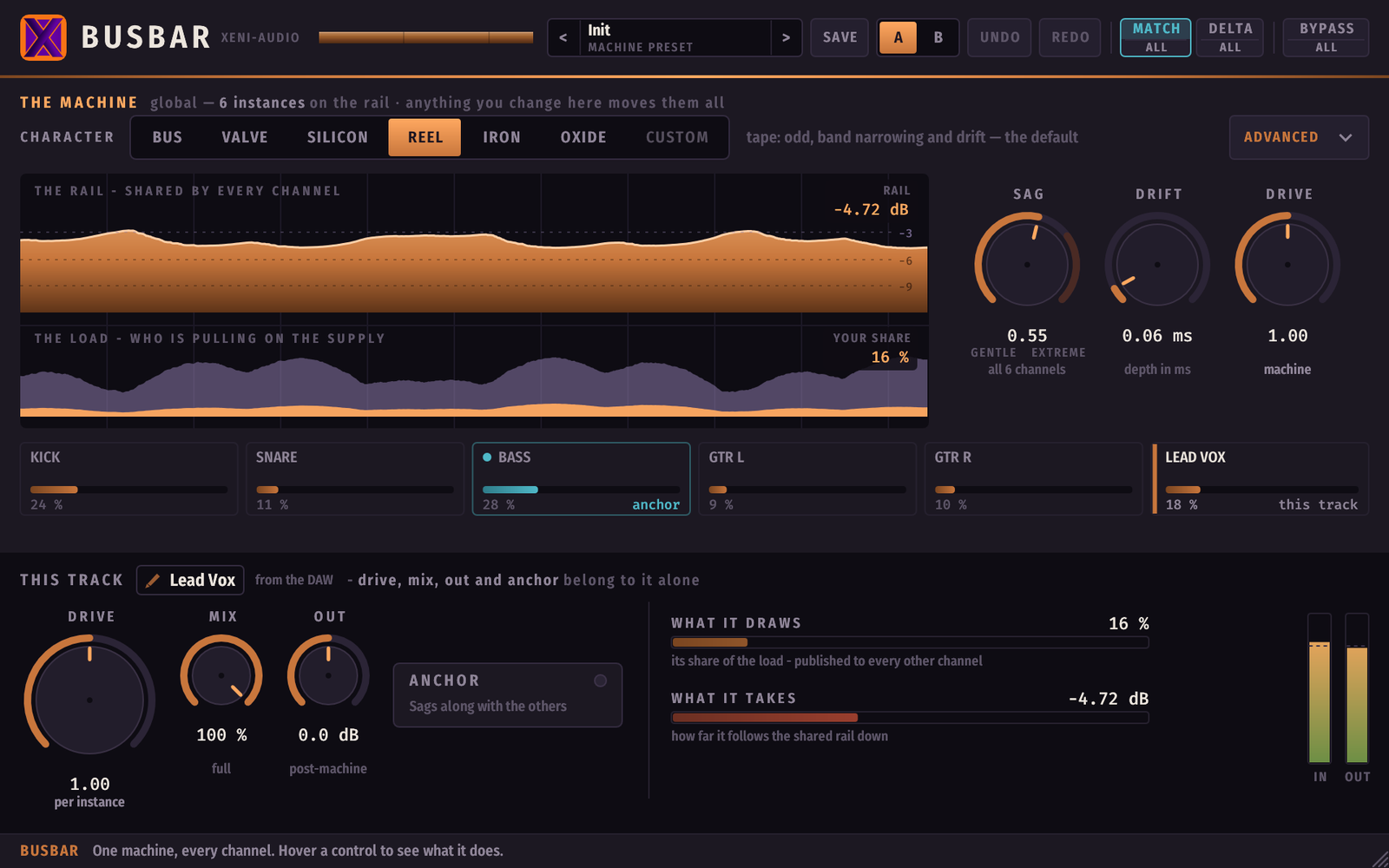
Busbar interface — the copper rail thinning under load, the stacked load meter, the park of channels with the anchored bass, and this track's drive, mix, out and anchor

The copper bar is the rail, and it gets thinner under load — below it, the stacked meter shows who is pulling, and the park shows every channel on the machine. The bass is anchored.

The Supply Is Common

The mix moves as one body, not six unrelated ones — and one track can be the one that never gives way.

Supply Sag
Each channel publishes what it draws. The sum makes one rail sag, and the saturation ceiling of every channel comes down together. When the chorus lands and everything pushes harder, everything compresses as one body — not six unrelated amounts, one shared amount.
🕰️
Shared Drift
One time base for everyone. All channels undulate in step, rather than as six decorrelated flutters that smear against each other. It is the difference between a machine and a pile of machines.
Anchor
An anchored track keeps loading the rail — it still makes everyone else dip — but does not dip itself. The lead vocal must not duck. But it must make everything else duck. That sentence is one switch here, and impossible anywhere else.
🎛️
One Sound, Your Dose
The character is the machine's, shared by every track. The Drive is per track: each channel chooses how much of the machine it takes. The kick takes less and keeps its weight — without anyone else changing.

Watch the Rail Sag

One supply for every channel. Push any track and the shared rail thins, so every ceiling comes down at once. Anchor a track and it loads the rail but never gives way.

● THE RAIL — one supply, every channel 6 instances · one machine SIX SEPARATE PLUGINS
⚡ One shared rail — the sum of everyone's draw 🕰️ One shared clock — everyone drifts in step ⚓ Anchors still load, but do not sag

In the plugin, that's the copper bar across the top of the window — thinner the harder the mix pushes.

Every Channel, From Any Window

One lane per track. Click another to take its controls without leaving your window — a violet band shows where you are, and the change reaches the other instance even with its window closed.
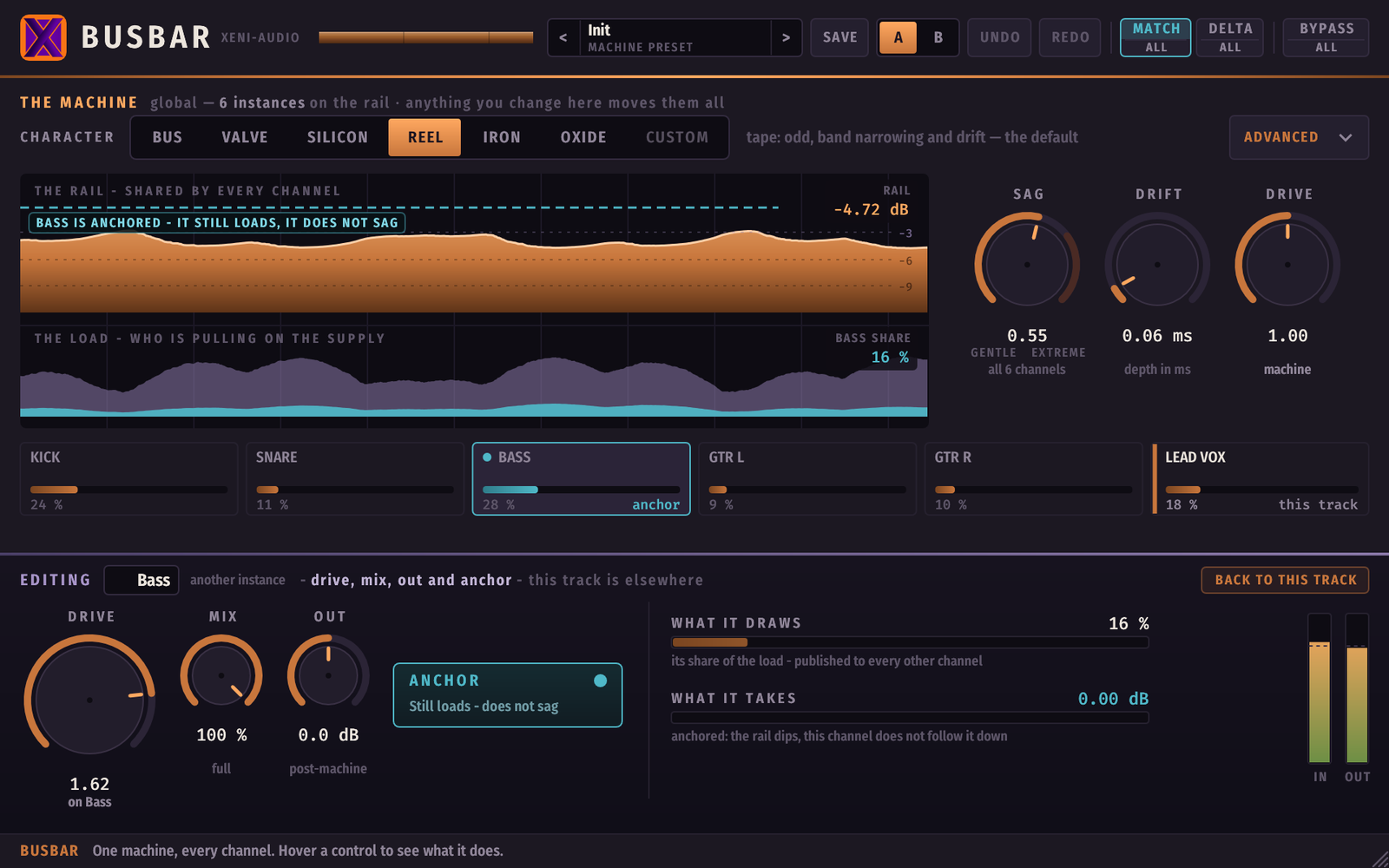
Busbar editing another track — the violet EDITING band shows the Bass channel's controls taken over from this window, with its Anchor engaged

Editing the bass from the vocal's window: its drive, its anchor, its share of the load — the rail callout says why.

Everything You Need

🎚️
Six Characters, Measured
bus, valve, silicon, reel, iron, oxide — each shaped from measurements of a real hardware unit, and level-matched: switching changes the sound, not the loudness.
🔬
The Advanced Drawer
The shape itself: bias, knee, tilt, the input transformer's high-pass and bump, band narrowing — plus SAG depth, DRIFT depth and machine drive. Edit anything and the panel tells you which character you came from.
Anchor
Per track: still loads the rail, does not follow it down. Two or three anchors in a mix is a lot — if everything is anchored, there is nothing left to sag.
🅰️
A/B & Global Undo
Two live memories of the whole desk, and an undo that moves every instance in one press — because a change to the machine was never local in the first place.
⚖️
MATCH — Honest Bypass
Level-matched bypass, on by default, so an A/B proves what the machine does to the sound and not how much louder it made you. The sag is not compensated — losing a decibel under load is the effect.
🔍
DELTA
Hear only what the machine adds. The panel turns violet while it is engaged so you cannot forget it on. Every listening aid exists per-track and machine-wide (All).
💾
Machine Presets
A preset carries the machine only — never a track's drive, mix, out or anchor, so recalling one can never flatten the balance of six tracks in one gesture. The library is shared and live across all instances.
⚙️
Quality
×1 / ×4 / ×8 oversampling for the whole machine. ×4 is the sane default; ×8 costs CPU for very little.
📖
Help Bar & Manual
Hover any control and the bar at the bottom explains it in plain English. Resizable window, and a full PDF manual in every download.

In Their Words

Love this thing!
— Cory L. · Direct message

Not an Emulation — On Purpose

Busbar isn't an emulation, and we'll say it plainly. A shared sag exists on no hardware — it's a deliberate effect, and that's the point: it does something a rack of separate boxes can't.

Technical Details

Formats VST3 · Audio Unit (macOS) · CLAP
Platforms Windows 10/11 x64 · Linux x86-64 · macOS 10.13+ (universal, Intel & Apple Silicon)
Channels Stereo in / stereo out
Machine size Up to 64 instances on one shared machine
Inter-instance link Lock-free shared memory — no sidechain bus, no routing, works across plugin formats
Characters 6 measured voices + custom, level-matched
Oversampling ×1 / ×4 / ×8, machine-wide
Presets Machine presets (shared library, live across instances), A/B of the whole desk, global undo
Parameters Automatable in VST3, AU and CLAP hosts
Framework Built with iPlug2 — open-source C++ audio plugin framework
License Perpetual, all your machines, free updates. Separate key from the other XeniAudio plugins.

Try Before You Buy

The demo is the full plugin — every control, every character, your settings saved with the session. The only limit is that the audio mutes for a few seconds every minute, on every instance at the same moment — because they share one machine. Put it on several tracks of a real session: that is the whole point. No sign-up required.

🪟
Windows
VST3 · CLAP — Windows 10/11 x64
↓ Installer (.exe) ↓ Archive (.zip)
🐧
Linux
VST3 · CLAP — x86-64
↓ Archive (.tar.gz)
🍎
macOS
VST3, AU & CLAP — macOS 10.13+ Intel & Apple Silicon
↓ Installer (.dmg)
🪟 Windows users — SmartScreen or antivirus warning? Click here

The Windows installer isn't code-signed, so SmartScreen may flag an unknown publisher. It's not a detection — keep the file and open it.

  1. Click "More info", then "Run anyway"
  2. Or skip the installer entirely: the .zip above contains the same VST3 and CLAP files — copy them into C:\Program Files\Common Files\VST3\ and C:\Program Files\Common Files\CLAP\

macOS

Nothing to do. The disk image, the installer and all three plugin bundles are signed with an Apple Developer ID and notarized by Apple, with the ticket stapled into the files so it works offline. The publisher shows as Tony Cuny — the legal name behind Xeni-Audio, which is what Apple puts on the certificate. Logic loads the AU with no workaround.

Free demo, no sign-up required. Resizing Busbar from the host's own window frame now keeps its aspect ratio, and the size you set that way is remembered when you close and reopen the editor — on macOS as well, where it was not followed at all. The sound is unchanged. After download, refer to the included README.txt and the PDF manual for installation — the manual is also readable online. The same demo is also available on Gumroad. Questions? support@xeni-audio.com

Changelog

Latest: v1.1.1all versions

1.1.11 Sep 2026

  • Resizing from the host's window frame no longer distorts the interface, and the size is remembered when you reopen the editor.
  • macOS now follows the host frame like Windows and Linux.
  • No change to the sound.

1.1.025 Aug 2026

  • The saturation now has memory — the five non-reel characters saturate later and keep their identity when pushed.
  • Deliberately changes the sound. Projects saved on 1.0.x keep the original “1.0 sound” and can switch on a click.
  • Fixed a Delta / Bypass-All display mismatch.

1.0.524 Aug 2026

  • Fixed a freeze on Windows when closing the plug-in window. Sound unchanged.

1.0.424 Aug 2026

  • The window keeps the size you chose when the host reopens it. Sound unchanged.

1.0.324 Aug 2026

  • No longer requires AVX2 — runs on any x86-64 CPU, fixing scan hangs on older machines. Sound unchanged.

1.0.221 Aug 2026

  • Character names now describe the circuit, not a hardware unit. Sound unchanged.

1.0.121 Aug 2026

  • Fixed the window not opening in Cubase, and on strict OpenGL drivers. Sound unchanged.

1.0.021 Aug 2026

  • First release.
39

One license, all formats, all platforms, all your machines, forever.

  • VST3, Audio Unit & CLAP formats
  • Windows · Linux · macOS (universal)
  • One shared machine — sag and drift common to every track
  • 6 measured characters + custom, level-matched
  • Per-track Drive, Mix, Out and Anchor
  • Edit any track from any window — the park
  • MATCH level-matched bypass & DELTA monitoring
  • Machine presets, A/B of the desk, global undo
  • All future updates
  • Separate license key from other XeniAudio plugins
Buy on Gumroad — €39
Secure checkout via Gumroad · License delivered by email