100% free — full version, no sign-up, no strings

StageThemAll
One Press. Every Track At Its Level.

Press Capture and play the part. StageThemAll listens, then sets one gain so the track reaches the level your next plugin was made for — and it's free.

It tells percussive from sustained by itself, ignores silence, and never pushes the peak past your ceiling. Every instance in the session is listed in every window: press Capture all, play the song once, and the whole mix is staged.

↓ Download Free See How It Works
1 Press To Stage
64 Listed Instances
3 Platforms
3 Formats
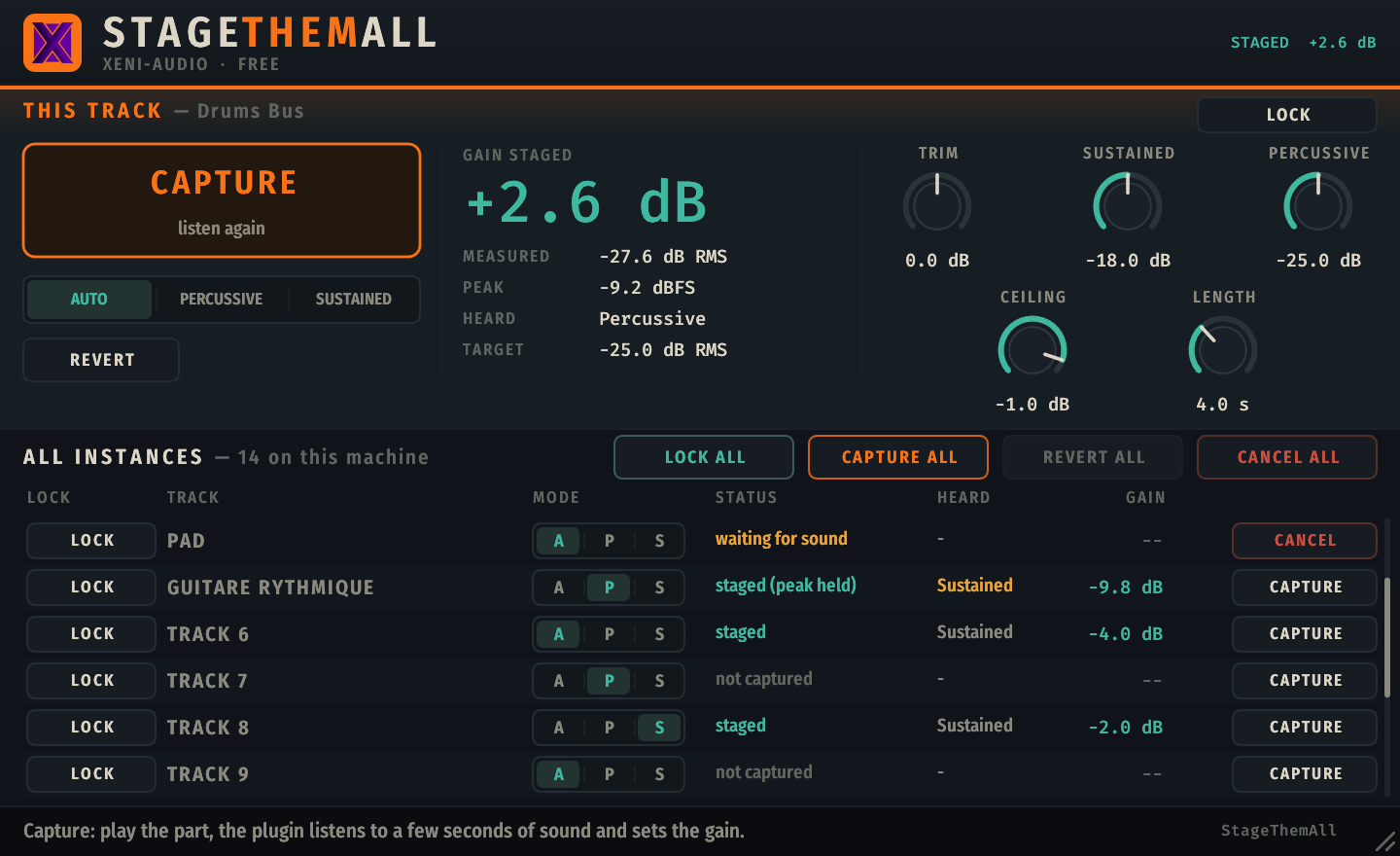
StageThemAll interface — Capture button, mode selector, staged gain, Trim and target knobs, and the list of every instance with Capture all, Revert all and Lock all

One track's panel on top, every StageThemAll in the session below — capture, lock or revert any of them from any window.

Right Level In, Before It Counts

Analogue-modelled plugins react to the level they receive: the same compressor or amp sounds different at −30 dB and at −10 dB. StageThemAll puts every track at the level those plugins expect, by measuring what the track really plays.

👂
It listens to sound, not silence
Anything under −70 dBFS is ignored and the capture clock stops while nothing plays. A part that plays rarely just takes longer — loop a region and let it listen.
🥁
Percussive or sustained
Hits and gaps are staged to a lower target (−25 dB RMS) than pads, bass and voices (−18 dB RMS), so peaks keep their headroom. Close call? It tells you, and you can force the mode.
🧱
One gain, a hard ceiling
A single gain brings the measured level to its target, never putting the measured peak above your ceiling (−1 dB by default). When the ceiling holds it back, the panel says so.

Each instance measures only its own input against its own target. Nothing is ever adjusted from another track's level — the list is a remote control, not a mixer.

Listen. Decide. Stage.

Capture all: every track listens at once while the song plays, then each one settles on its own gain. Three sources, three different levels, one pass.

● LISTENING staged level peak ceiling
👂 Silence pauses the clock 🥁 Percussive or sustained, decided for you 🧱 The peak never crosses the ceiling

Small Plugin, Whole Session

🎯
One-Press Capture
Press Capture, play the part, done. A second press cancels. Length is 1–10 s of actual sound, 4 s by default.
📋
Every Instance, Every Window
All StageThemAll instances on the machine are listed in each window, up to 64. Rename them, set a mode, capture or cancel any track from anywhere.
⚡
Capture all
Every unlocked track listens at the same time. Play the song once and the whole session is staged — then Revert all, or Redo all, to compare.
🔒
Lock What You Like
A locked track is skipped by capture, mode, revert and the global buttons. Lock all, redo the one track you want — and the lock is saved with the project.
↩️
Revert, Always
Revert goes back to the gain from before the last capture; press again to come back. Reopen a project and nothing is re-measured.
🖱️
Trim, Hints, Resize
Trim (±24 dB) is automatable on top of the staged gain. Hover hints explain every control, and the window resizes from its corner, saved with your project.

Where It Shines

🎛️
Before an analogue model
Put it first on the chain, ahead of the compressor or amp whose character depends on input level. −18 dB RMS is the usual 0 VU.
🎚️
A fresh session
Drop an instance on every track, press Capture all, play the song once. Start mixing from a balanced floor instead of from raw gain.
🔁
Sparse parts
A part with long rests? Loop a region where it plays and press Capture: the clock only advances on sound, so it keeps listening until it has enough.
👂
Keep what you set by ear
Lock the tracks you already like, press Capture all, and only the rest is staged. Nothing you did by hand is touched.

Built to Perform

Specification Details
Plugin Formats VST3 (Windows, Linux, macOS) — AU (macOS) — CLAP (Windows, Linux, macOS)
Platforms Windows 10/11 (64-bit) — Linux x86-64 — macOS 10.13+ Intel/Apple Silicon (universal)
Measurement RMS in 10 ms frames, silence below −70 dBFS ignored, gaps over 200 ms far under the loudest part left out
Controls Trim (−24…+24 dB, automatable), Sustained target (−30…−6 dB RMS, default −18), Percussive target (−40…−10 dB RMS, default −25), Peak ceiling (−12…0 dBFS, default −1), Capture length (1…10 s, default 4)
Multi-instance Up to 64 instances listed over shared memory, auto-discovered. Hosts that load each plugin in its own protected process still capture the current track
Latency None — it changes only the level of the track: no filtering, no dynamics
Framework Built with iPlug2 — open-source C++ audio plugin framework
Price Free — full version, no license key, no account, no time limit.

Yours. For Nothing.

StageThemAll is completely free — the full plugin, not a demo. No sign-up, no license key, no watermark, no muting.

🪟
Windows
VST3 · CLAP — Windows 10/11 x64
↓ Installer (.exe) ↓ Archive (.zip)
🐧
Linux
VST3 · CLAP — x86-64
↓ Archive (.tar.gz)
🍎
macOS
VST3, AU & CLAP — macOS 10.13+ Intel & Apple Silicon
↓ Installer (.dmg)
🪟 Windows — SmartScreen warning, or using Cubase / Nuendo? Click here

The Windows installer is not code-signed, so SmartScreen may say the publisher is unknown, and a brand-new installer occasionally trips an antivirus heuristic. Neither is a detection — it is a reputation score that every unsigned release starts from zero.

  1. Click "More info", then "Run anyway"
  2. Or skip the installer entirely: the .zip above contains the same VST3 and CLAP files — copy them into C:\Program Files\Common Files\VST3\ and C:\Program Files\Common Files\CLAP\

Cubase & Nuendo

On Windows the resize grip is inactive in these two hosts — use the host's own window edge instead.

macOS

Nothing to do. The disk image, the installer and all three plugin bundles are signed with an Apple Developer ID and notarized by Apple, with the ticket stapled into the files so it works offline. The publisher shows as Tony Cuny — the legal name behind Xeni Audio, which is what Apple puts on the certificate. Logic loads the AU with no workaround.

v1.0.0 — Free, no sign-up required. First release. After download, refer to the included README.txt and the PDF manual for installation — the manual is also readable online. Questions? support@xeni-audio.com

If StageThemAll earns a place in your sessions, the rest of the XeniAudio range shares the idea: instances that talk, no routing.

Changelog

Latest: v1.0.0all versions

1.0.016 Nov 2026

  • First release. One-press gain staging for Windows, macOS and Linux (VST3, CLAP, and AU on macOS).
  • Capture, Auto / Percussive / Sustained modes, Trim, Revert and Revert all / Redo all.
  • Every instance listed in every window, with Capture all, Lock and Lock all.
  • macOS signed and notarized by Apple.